Scan Pokémon cards. Check their value free.
Point your camera at a card or add a photo. Get the exact printing and its market price from 20,853 English Pokémon cards.
How to scan a Pokémon card
- Lay the card flat. Put one card on a plain surface in even light and fill the scanner frame.
- Hold for a beat. Keep the camera steady. The scanner locks when the card matches cleanly, or you can upload a photo.
- Check the number. Match the set symbol and collector number on your card with the result before you use the price.
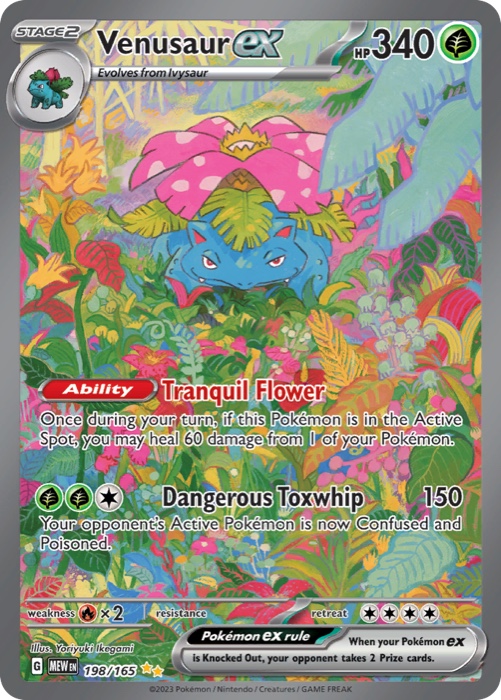
 Bottom left of the card, shown at full size.
Exact card first. Price second.
The same Pokémon art can appear in several sets, promos, and finishes. A scan narrows a photo to one printing. The small marks at the bottom of the card prove it.
- Set code or symbol
- MEW means Pokémon 151. Older cards use a symbol instead. Match a set symbol.
- Collector number
- 003/165 is the card's number in the set. Numbers above the total mark secret rares. Read card numbers.
- Rarity mark
- ★★ marks a Double Rare. Decode rarity symbols.
Holo, reverse holo, and regular copies share the same art. That is why each result lists a price for every finish. Tell the finishes apart.
- Cards
- 20,853
- English sets
- 182
- Years covered
- 1999–2026
- Download
- 1.4 MB
Your photo never leaves your device.
When you start a scan, the page downloads a compact fingerprint of every card in the library. Each fingerprint records a card's shapes and colors at very low resolution. Your camera frame gets the same treatment, and your browser finds the closest fingerprint. No image is uploaded, saved, or shared.
The fingerprints come from the same reference library the MonZap iPhone app uses, last updated September 17, 2026. Prices come from MonZap's TCGplayer and Cardmarket catalog, and every result shows the date it was checked.
Know the limits
- English cards only. Japanese cards and brand-new sets may not match yet.
- Glare, sleeves, top loaders, and binder pages make a clean match harder.
- A match identifies the printing. It does not check condition, grade, or whether a card is real. Spot a fake card.
Pokémon card scanner questions
Straight answers about cost, privacy, coverage, and prices.
Is this Pokémon card scanner really free?
Yes. Scan as many cards as you want on this page. There is no account, email, or payment. The MonZap iPhone app is also free to download and offers optional in-app purchases.
Do I need an app to scan Pokémon cards?
No. This scanner works in Safari, Chrome, Edge, and Firefox on phones and computers. Use your camera or upload a photo. The MonZap iPhone app adds back-to-back scanning, a saved collection, and price history.
Does the scanner upload my photos?
No. Your camera feed and photos stay on your device. The page downloads card fingerprints once, about 1.4 MB, and does the matching in your browser. MonZap never receives or stores the images you scan.
Which Pokémon cards can it scan?
It covers 20,853 English Pokémon TCG cards from 182 sets, from 1999 through 30th Celebration. Japanese and other non-English cards are not in the web scanner yet. New English sets appear after MonZap's scanner library updates.
Why didn't my card match?
Glare, sleeves, top loaders, busy backgrounds, and blur hide the details the scanner compares. Take the card out of its sleeve if you can, set it on a plain surface, and fill the frame. Very new sets, non-English cards, and custom cards may not be in the library.
How accurate are the prices?
Each result shows TCGplayer and Cardmarket market references with the date they were checked. They are not guaranteed sale prices. Finish, condition, grading, and timing all change what a card sells for, so check recent sold listings before you buy or sell.
Can it tell holo from reverse holo, or grade my card?
Not from one photo. Holo, reverse holo, and regular copies share the same artwork, so a result lists the price for each finish. Look for foil shine to pick the right one. The scanner does not judge condition, grade, or authenticity.
Can I scan a whole binder?
This page scans one card at a time. The MonZap iPhone app scans card after card and saves each match to your collection.